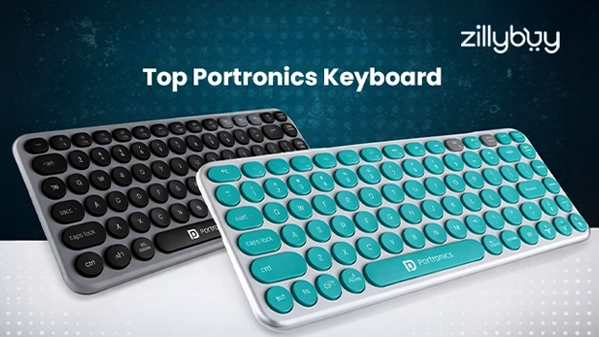
Top Portronics Keyboard: Features, Price & Performance Explained
Improve your typing experience and discover Portronics keyboard options with smart features and smooth performance for daily use.
Would you like to remove cords from your desk clutter and improve your workspace's appearance? Your keyboard is one of the most valuable tools you have as an evening programmer, a student getting work done late at night, or someone who can do multiple things at once. Today, we will explore how Portronics has changed the way we see affordable keyboards by adding a unique blend of style and function.
Whether it’s the tactile feedback of a mechanical keyboard or the lightweight and portable design of a foldable keyboard, Portronics has a keyboard for every type of person out there. In this ultimate guide, we’ll discuss the features, pricing, and performance of Portronics’ various keyboards so you can find your ideal keyboard on Zillybuy.
Why Choose a Portronics Keyboard?
Portronics has established a unique position in India by providing good-quality peripherals at prices that don't put excessive strain on your pocket. When you buy a Portronics keyboard, you are getting more than just a keyboard; you are also getting an extraordinarily versatile piece of equipment. You can switch from your computer to your tablet or any other electronic device with a simple keystroke, which describes most of the newer Portronics keyboards that have either 2 or 3 options for connectivity.
Portronics Hydra 10: The Triple-Threat Performer
Enthusiasts agree that the Portronics Hydra 10 is the "Gold Standard," but it isn't just another Portronics keyboard; it also acts as a multi-device hub. The keyboard has 68 compact keys, which saves room and still delivers that tactile scale "thok" sound mechanical fans love.
- Connectivity: The Portronics Hydra 10 is truly a hybrid device that can be used with Bluetooth (version 5.0) as a wireless keyboard at 2.4 GHz, can be plugged in via Type-C as an ordinary wired keyboard, and will also work in all three of these ways attached to multiple devices at the same time. The Portronics Hydra 10 also supports wireless connections over 4G LTE, Wi-Fi hotspots/Internet, and direct cable connection.
- Visuals: The Hydra has 16.8 million RGB colors available with multiple lighting modes that can complement your moods, depending on what you'll be doing whilst using it.
- Performance: With Brown switches, the Hydra provides a perfect balance, making it suitable for users who find Red switches too soft and Blue switches too loud.
Portronics Bubble 2.0: The Aesthetic Space-Saver
If you're looking to have a visually appealing and Pinterest-worthy wireless keyboard on your desk, the Portronics Bubble 2.0 will fulfill your wish. The design of this TKL (Ten Keyless) keyboard is perfect for the modern-day multi-tasker who uses their laptop, smartphone, and tablet all at the same time.
- Multi-Device Connection: Made specifically for Bluetooth, this Portronics keyboard can connect to multiple devices at the same time, letting you easily switch between reading an email on your PC and sending a text message from your phone with just one touch of a button.
- Quiet Typing: Thanks to the use of round, concave-shaped keys, the Portronics Bubble 2.0 has been designed for quiet operation, making it the ideal Wireless Keyboard for those working in quiet offices or for doing nighttime research or homework.
Portronics Key 12 Combo: The Color-Popping Duo
Why go with a dull black color when you can have something fun? The Portronics Key 12 has been designed with ergonomics and lifestyle in mind and is a combination of a wireless keyboard and mouse that is manufactured by Portronics.
- Vibrancy: This multicolour design will add a little bit of excitement to your work area, rather than just having it feel like a cubicle, making it feel more like an art studio.
- Wireless: Using one 2.4 GHz Nano receiver for both keyboards and mouse allows you to save USB ports too.
- Functionality: It comes with a full-sized layout (including a numeric keypad), making Portronics keyboards suitable for accounting and data entry.
Portronics Ki Pad 4: The Reliable Workhorse
If you’re looking for a simple, reliable keyboard to fit everything you do every day in school labs, home offices, or other everyday activities, the Ki Pad 4 is a great option.
- Ergonomic: It is designed with adjustable-height feet and 1.5 meters of cable so you can place your keyboard where it fits best for you.
- Easy to Use: Compared to a Portronics Bluetooth keyboard, the Ki Pad has no batteries to recharge, and there is no need to worry about losing connectivity; simply plug the proverbial blue USB interface into your computer, and you are ready to type!
- Built to Last: The architecture of this product has been tested for water resistance; the keycaps are produced using a high-quality printing process that allows them to last for years without fading.
Portronics K1 Keyclicks: The Heavy-Duty Gamer
The full-sized mechanical Portronics K1 Keyclicks is designed to be sturdy enough to take punishment and last. In addition to the ability to connect with other Portronics wireless keyboard, the wired-only configuration will ensure that there is no latency when playing high-level games.
- Mechanical Precision: K1 Peltronics features 104 full-size mechanical switches that are equivalent to blue switches, which provides you with the clicking sound you want to hear when hitting the key.
- RGB Lighting: In addition, the RGB light offers a variety of breathing and static light options, which not only look great but also provide an added level of illumination to any gaming setup.
- Build: The K1 is built for long-term use with heavy-duty construction that helps to eliminate noise caused by sliding during heavy gaming sessions.
Setting Up Your Portronics Wireless Keyboard
To begin using your new Portronics keyboard, it will be very simple to set up. Typically, these steps will apply to most models:
1. To turn the power on, you will have to toggle on the switch located on the back or bottom of the device.
2. If you are using a Bluetooth Portronics keyboard, hold down the Function and keys (1, 2, or 3) to enter pairing mode.
3. If you're using your keyboard wirelessly with a dongle, plug in the blue receiver to a USB port on your computer.
4. The Portronics keyboard has a battery-saving feature called "auto-sleep." Your keyboard will enter auto-sleep mode after 10 minutes of inactivity, preventing your battery from dying.
Maintenance and Care Tips
Tips to Keep Your Portronics Keyboard Running For Years:
- Cleaning: Remove dust between keys with a soft brush or compressed air.
- Charging: Use only a 5V adapter or use the USB port on your laptop for recharging. Do NOT use any kind of high-wattage fast charger.
- Spills: Some models of Portronics wireless keyboards have some splash resistance, but it is still safer to keep liquid away from the keyboard at all times.
Why Buy Portronics Keyboards from Zillybuy?
Kicking off your purchase with Zillybuy when upgrading your current setup with a Portronics keyboard lets you be secure in terms of value and assurance. 100% authentic products provide assurance to you about not receiving any counterfeit products that most of the major online retail sites have in their inventories. You can also receive discounts from Zillybuy on other Portronics items as well. If you need a high-speed Portronics wireless keyboard for gaming or a multi-device Portronics bluetooth keyboard for office work, Zillybuy has a special discount program for multiple devices.
Final Thoughts
Portronics keyboards offer fantastic value, whether you're considering a casual-use model or a high-end professional coding model. They have excellent construction, especially for the price point. Plus, the range of color options available in their different product lines—such as the Bubble series—makes them an attractive addition to your home office space.
At Zillybuy, we feel a quality wireless keyboard should not be seen as a luxury item, and Portronics demonstrates this accurately with their innovative and reasonably priced range.
Frequently Asked Questions (FAQs)
1. Is the Portronics keyboard a good choice for daily use?
Ans. Yes! Portronics keyboards are great for daily use, such as typing documents and browsing the internet, as well as completing tasks for work-related purposes.
2. What's better? A Portronics wireless keyboard or Bluetooth keyboard?
Ans. When it comes to using multiple devices simultaneously, Portronics bluetooth keyboards will provide a better way of using multiple devices simultaneously. Whereas, using a single device with a Portronics wireless keyboard is much easier.
3. Will my Portronics Keyboard work with my mobile phone?
Ans. Yes! Portronics Bluetooth Keyboards can connect effortlessly to smartphones or tablets.
4. How long does a Portronics keyboard battery last?
Ans. Typically, depending on how often the keyboard is used, the battery will last between several weeks and many months.
5. Can I use my Portronics Keyboard to play Video Games?
Ans. Portronics keyboards are primarily designed for regular use; therefore, they are not designed for heavy gaming but can be used for light gaming purposes.